
one
Emergency leak intake
Riley answers when water is where it shouldn't be — captures the issue, address, and urgency so you know whether it's a tonight job or a tomorrow job.
HiRiley answers your missed plumbing calls — emergency leaks, drain backups, water heater service, estimate requests — captures the details, and texts you the lead. Keep your current number. Set up in five minutes.
No credit card. Keep your number.
Set up in 5 minutes.
24/7
Always answered
< 1 min
To your phone
$29/mo
80 min included
McKinney Elite Plumbing
A homeowner called after hours. Here's how Riley handled it — start to finish, no script, no human.
Unedited recording. Caller name and address in sample details are test data; phone audio is real.
one
Riley answers when water is where it shouldn't be — captures the issue, address, and urgency so you know whether it's a tonight job or a tomorrow job.
two
Drain backups, water heater replacements, and remodel quotes all get captured with the same care — no matter when the caller rings.
three
You get the name, address, issue, and callback by text the moment the call ends, while you're still on the job you're already running.
Every call Riley handles ends with the details in your hands — a text the moment it happens, and a full summary with transcript when you sit down to review.
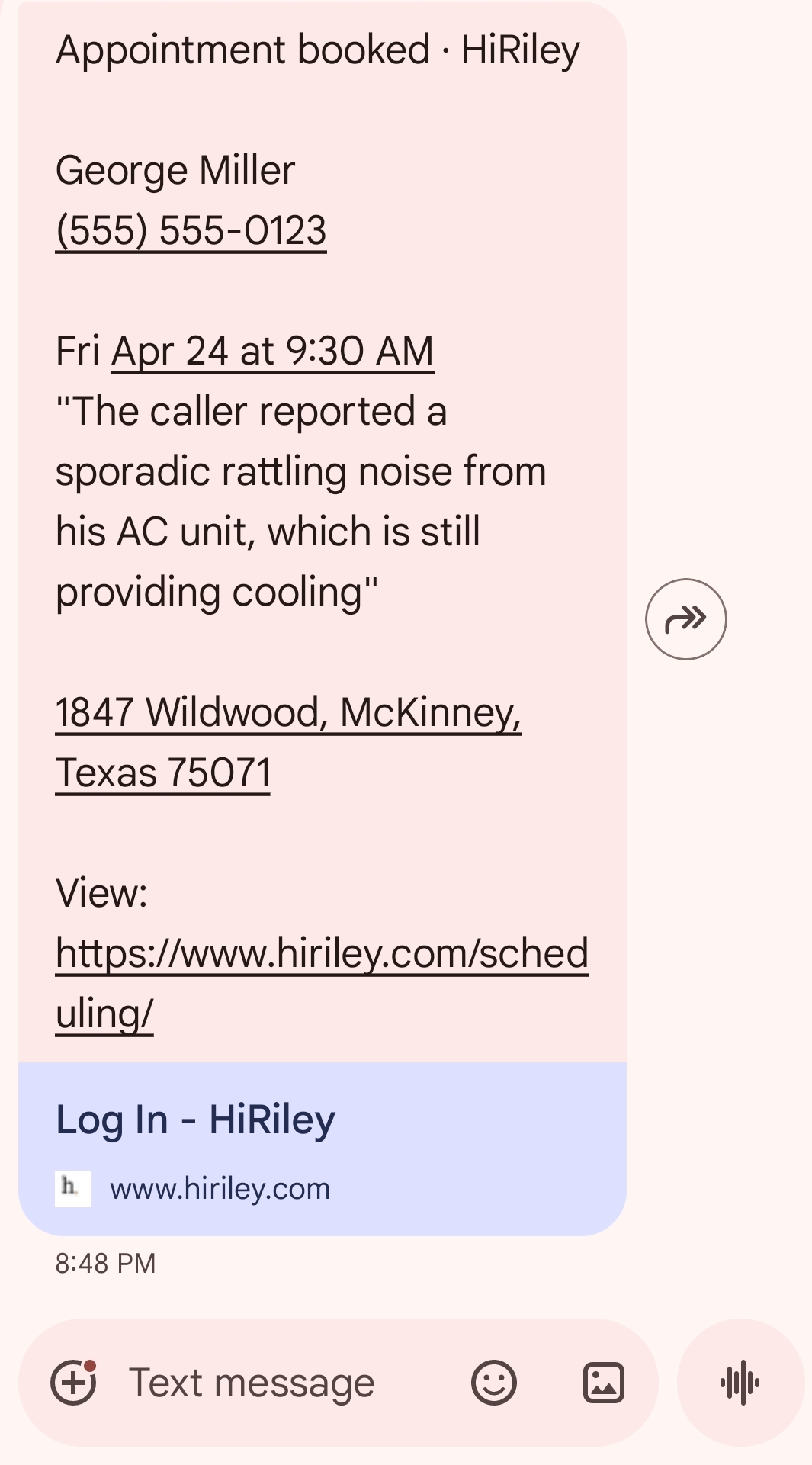
The second Riley books the job, your phone buzzes. Name, number, when they're coming, what they need — before you finish the work already in front of you.
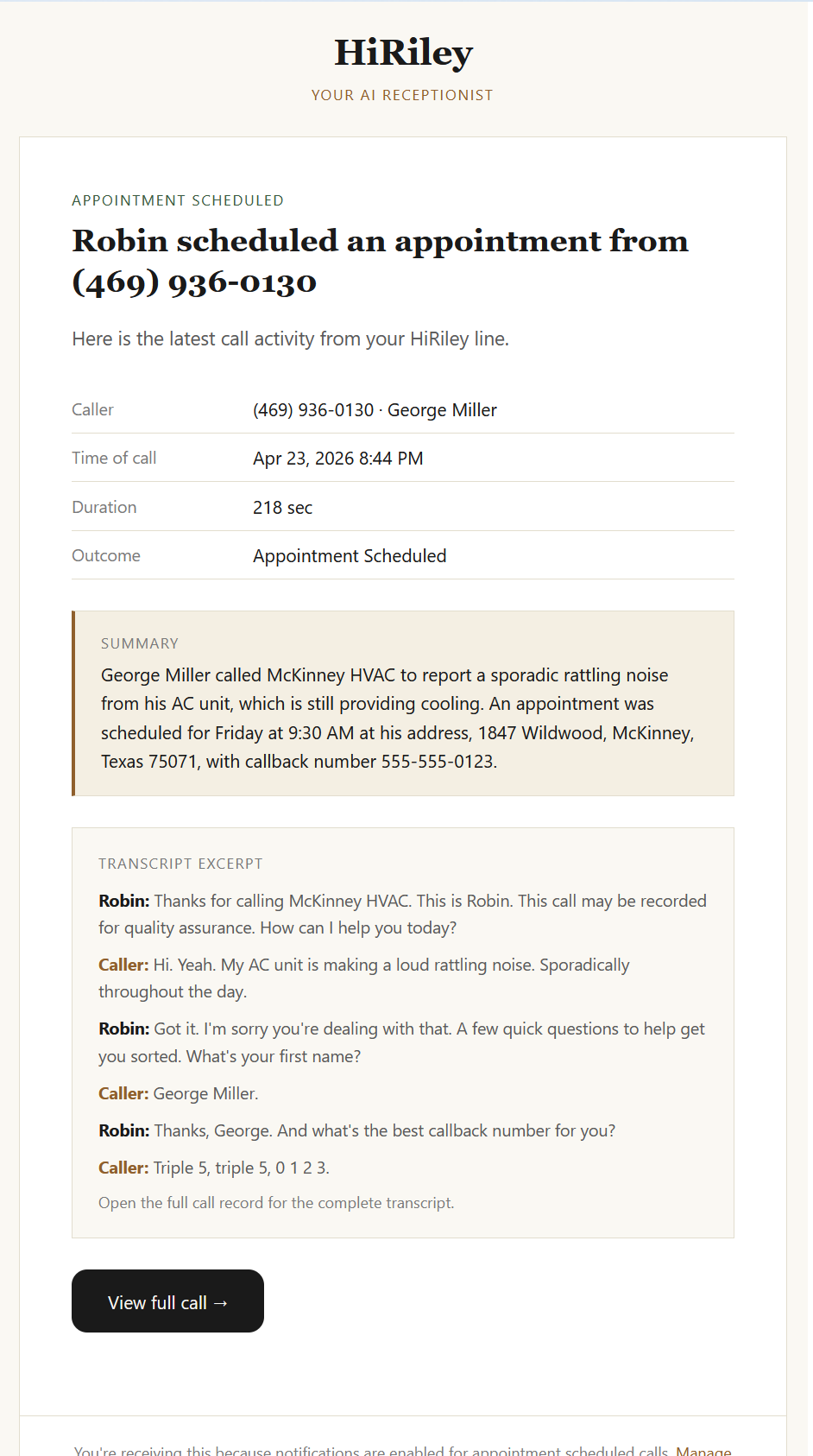
At the end of the day, read the full conversation. Summary, transcript, call duration — everything Riley said and everything they said back. Nothing is a black box.
01
Tell Riley about your business — who you are, what you do, and how you want calls handled. She'll use it on every call she answers.
02
One carrier code, typed into your phone. Takes about 60 seconds. Customers keep calling your existing number — Riley only picks up the ones you miss.
03
Every call shows up in your dashboard with a full transcript. Every lead gets texted to your phone. Every appointment lands on your calendar.
Start with 10 free calls. Call Shield, Call Assistant, and Front Desk plans include monthly minutes, call summaries, spam screening, transfers, and dashboard access.
80 included minutes
200 included minutes
500 included minutes
Start free. No credit card required.
You wouldn't hand your phone to a stranger without some questions. Here are the three that come up most — and the honest answers we give.
Question one
Riley uses natural-sounding voice AI. Most callers don't realize they're talking to an AI. You can pick from 22 voices, preview each one before going live, and switch anytime.
Question two
Riley stays inside the playbook you give her. Anything outside it gets captured as a detailed message — with everything you'd want to know — so you can follow up personally.
Question three
Riley transfers the call to you, or the right person on your team, in real time. No phone trees, no hold music — just a clean handoff.
Create your account, add your business details, choose how Riley should handle calls, and turn on call forwarding from your phone. Connect Google Calendar during setup if you want automatic booking.
No. Riley works with your existing business number. Customers still call the number they already know — your line forwards unanswered calls to Riley.
You control how direct the greeting is. The goal is a professional, natural-sounding call that captures what you need.
Riley stays inside the playbook you give her. If a caller asks something outside it, she captures the full message and passes it along so you can follow up yourself.
Yes. You decide what counts as urgent, when Riley should text you, and when she should transfer the call or take a message instead.
No. Calendar sync is optional. Riley can still answer calls, qualify leads, and text you the details even without a connected calendar.
Riley screens out robocalls, telemarketers, and obvious solicitors so your dashboard stays focused on real customers.
Yes. Invite employees and control whether they see everything or only the calls and appointments assigned to them.
Start with 10 free calls handled by Riley. No credit card, no time limit, no strings.
Most businesses can be live in about five minutes once call forwarding is turned on. If your carrier makes it fussy, support can help you through it.
No. Caller data is processed only to provide HiRiley features and is never used to train AI models. We never sell your information.
§ 09
Try it free
10 free calls. No credit card. No commitment. If Riley earns a spot, choose the monthly plan that fits your call volume. If not, do nothing — your account just stops answering.
Set up in five minutes